

Small Business Server vs Cloud: Which Is Right for Your Company in KSA?
Quick answer
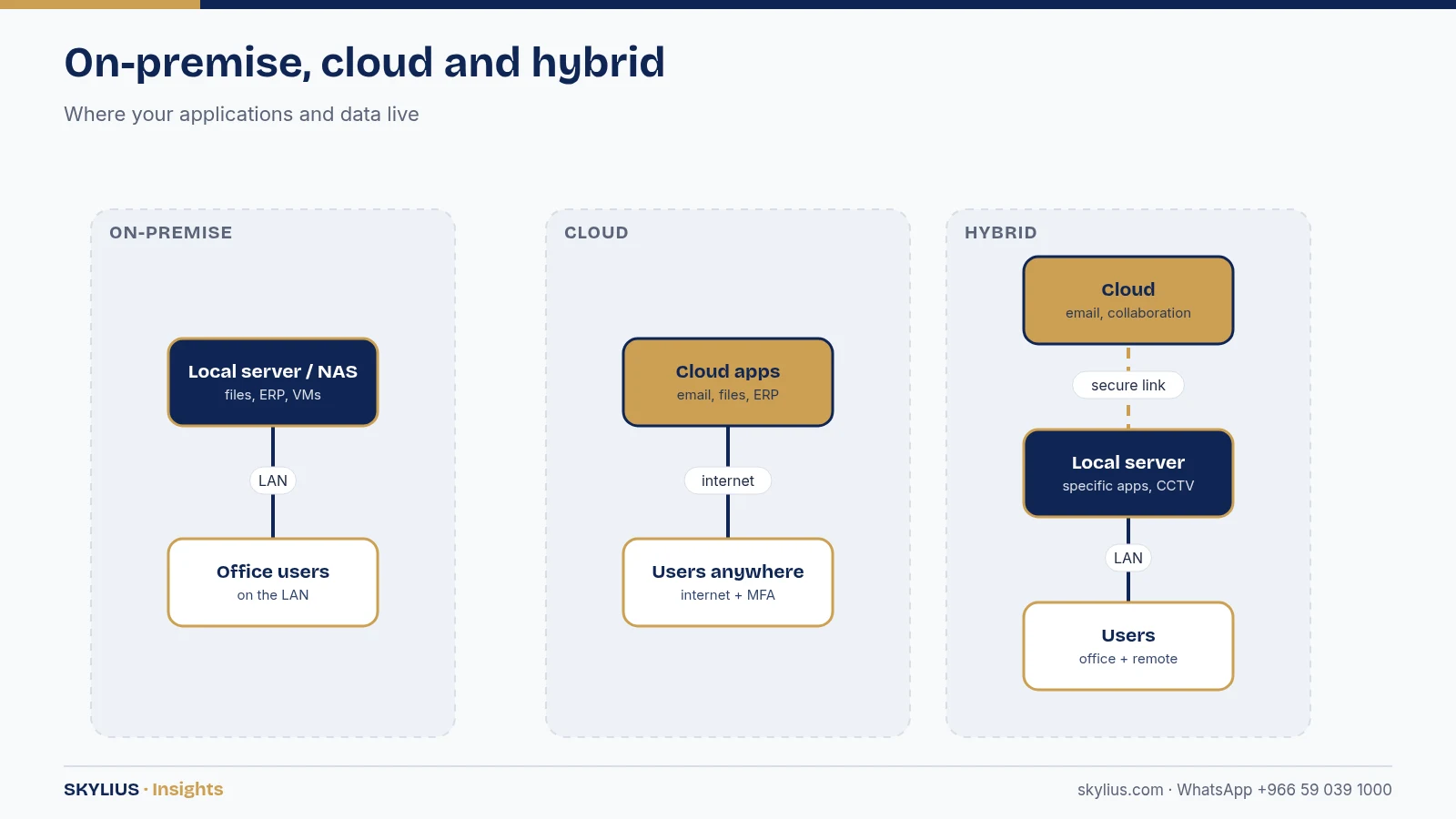
An on-premise server gives you local control, fast access to large files and predictable one-off hardware investment, but you are responsible for power, cooling, backups, security and replacement. Cloud services (such as Microsoft 365, Google Workspace, cloud ERP or virtual servers) turn IT into a monthly subscription, reduce hardware management and make remote work easier, but depend on internet connectivity and ongoing fees. Most Saudi small and medium businesses end up with a hybrid: email, files and collaboration in the cloud, and a small local server or NAS for specific applications, CCTV recording, large files or systems that must stay on-site. Whatever you choose, plan backups, security and data-residency requirements from the start, and check sector rules for where data may be stored.
What we mean by “server” and “cloud”
On-premise server
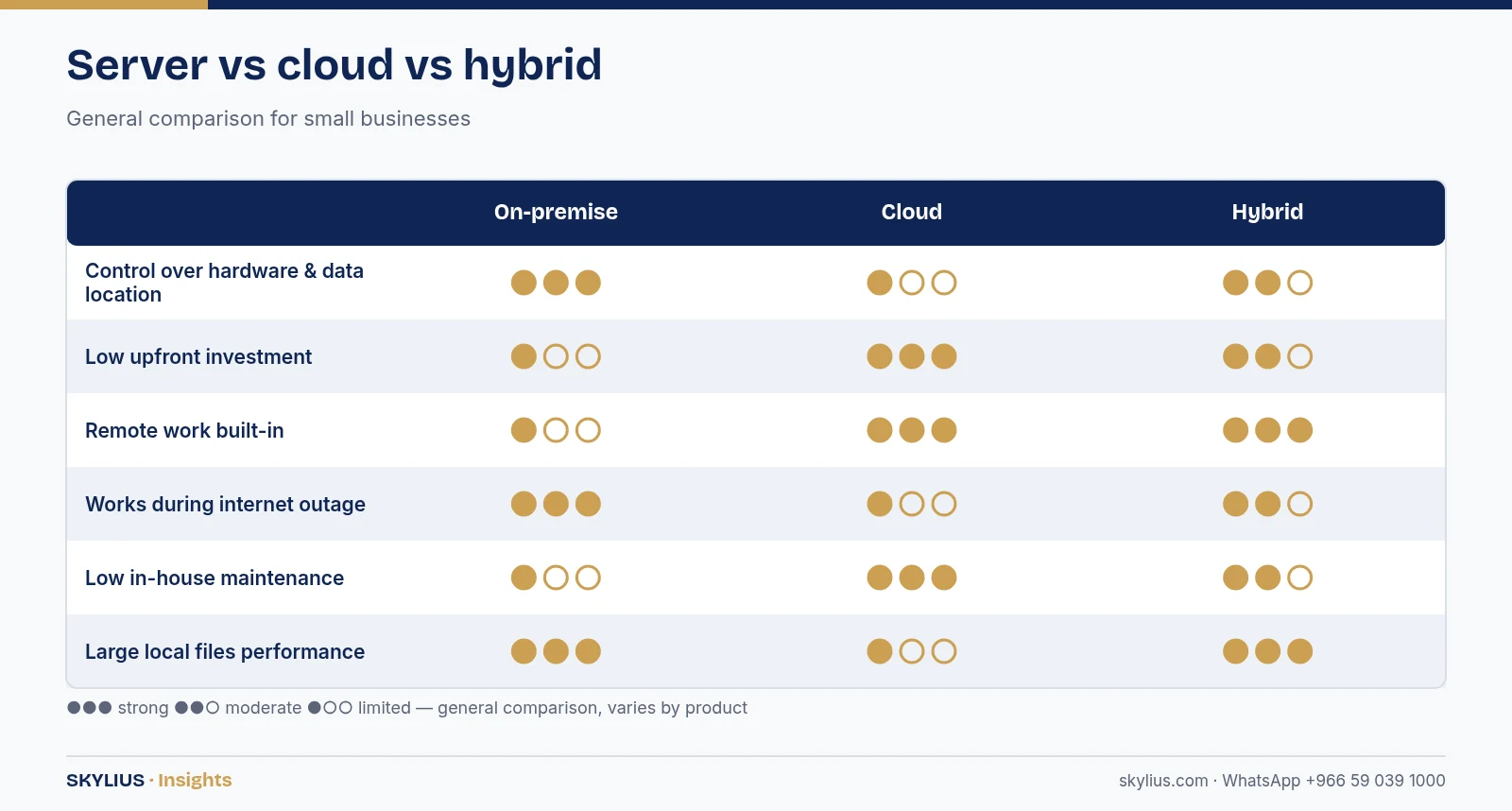
A physical computer in your office or server room that runs services such as file sharing, user accounts (Active Directory), accounting or ERP databases, print services, or virtual machines. It may be a tower server, a rack server or a NAS (network attached storage) device.
Cloud
Services you use over the internet and pay for by subscription:
- SaaS (software as a service) – email, office apps, file sharing, CRM, accounting, ERP.
- IaaS / virtual servers – servers you rent in a provider’s data centre to run your own applications.
- Backup as a service – off-site copies of your data.
Hybrid
A combination of both, connected securely. This is the most common pattern for SMEs.
Side-by-side comparison
| Factor | On-premise server | Cloud (SaaS / IaaS) | Hybrid |
|---|---|---|---|
| Cost structure | Upfront hardware + licences, then maintenance | Ongoing subscription per user/resource | Mix of both |
| Control | Full physical and configuration control | Provider manages infrastructure | Control where you need it |
| Internet dependency | Local users work during outages | Needs reliable internet | Critical local services keep running |
| Remote work | Needs VPN or remote access setup | Built in | Built in for cloud parts |
| Large local files | Fast on the LAN | Limited by internet speed | Keep large files local |
| Maintenance | Your team or IT contractor | Mostly provider | Shared |
| Scalability | Buy new hardware | Scale up/down quickly | Flexible |
| Data location | On your premises | Provider’s data centre (check region) | Choose per workload |
| Hardware lifecycle | Replace every few years | Not your concern | Smaller local footprint |
General comparison; actual terms depend on the provider, products and your setup.
When an on-premise server makes sense
- You run software that must be installed locally or needs fast database access on the LAN.
- You work with very large files (engineering drawings, video, imaging) and internet bandwidth is limited.
- You need to record CCTV or run building systems locally.
- You have sector or contractual requirements to keep certain data on-site.
- You have a suitable room with power protection (UPS), cooling and physical security.
When cloud makes sense
- Your team works across multiple branches, from home, or on the road.
- You want to avoid hardware replacement cycles and server-room costs.
- Your main tools are email, documents, collaboration and SaaS business applications.
- You want built-in redundancy and the provider’s security features such as multi-factor authentication.
- You prefer a predictable monthly cost per user.
Data residency and regulations in Saudi Arabia
Where your data is stored can matter. Saudi Arabia’s Personal Data Protection Law (PDPL) governs the processing of personal data, including transfers outside the Kingdom, and some sectors and government-related entities have additional cloud and cybersecurity requirements from authorities such as the National Cybersecurity Authority (NCA) or sector regulators. Several major cloud providers now offer data-centre regions in the Kingdom. Check the requirements that apply to your organisation and sector with the official authority or a legal adviser before choosing where to host data.
Backup: non-negotiable in both models
Neither a server nor the cloud is a backup by itself. A RAID array protects against a single disk failing, not against ransomware, deletion or fire. A sync folder can replicate a deleted or encrypted file just as quickly as a good one. A widely used rule of thumb is 3-2-1: three copies of data, on two different types of storage, with one copy off-site – and ideally one copy offline or immutable so ransomware cannot alter it.
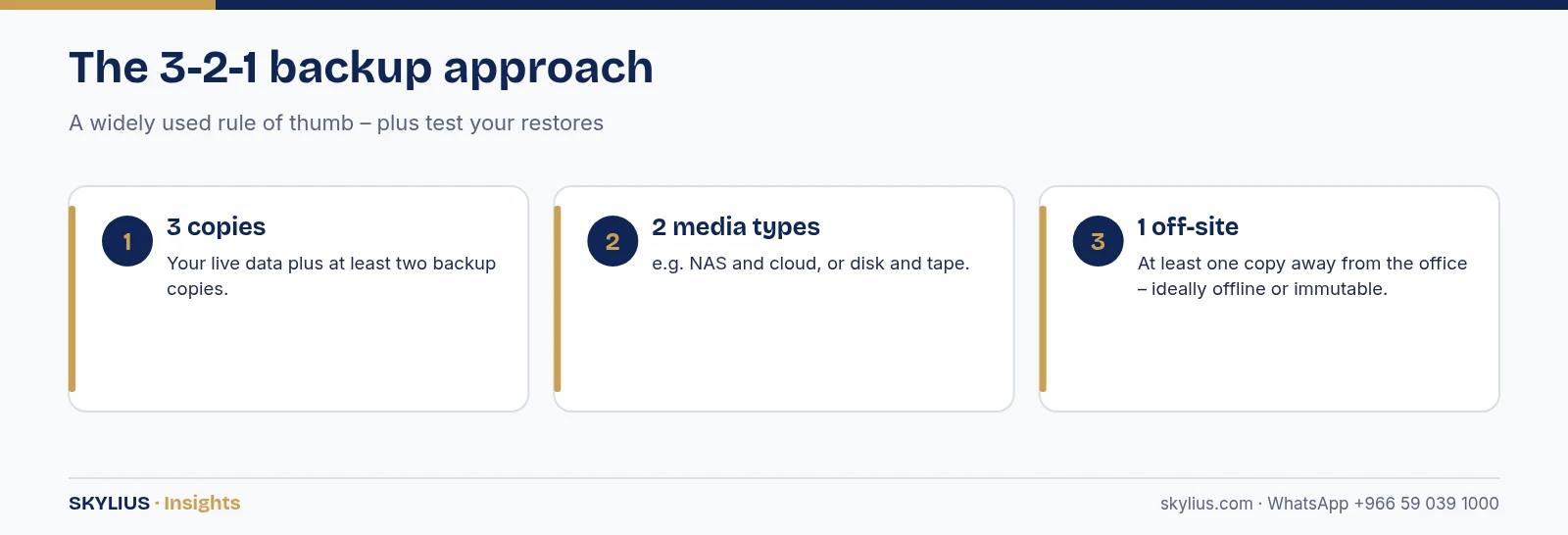
Test restores regularly. A backup that has never been restored is an assumption, not a plan.
Hidden costs to consider
On-premise
- UPS, cooling and a suitable lockable room or rack.
- Operating system and client access licences.
- Backup hardware and software.
- Monitoring, patching and support.
- Hardware replacement at end of life.
Cloud
- Per-user subscriptions that grow with headcount.
- Higher internet bandwidth and a backup internet link.
- Third-party backup for SaaS data, if required.
- Migration effort and staff training.
Recommendations by company profile
Small office (under ~20 users)
Cloud email and file collaboration, a firewall, managed endpoints, and cloud backup. A NAS only if you have large local files or CCTV.
Growing SME with local applications
Hybrid: cloud email and documents, a small virtualised server for local ERP or databases, VPN for remote users, and off-site backup.
Multi-branch company
Cloud-first for collaboration and identity, central management of devices, secure site-to-site connectivity, and local servers only where performance or regulations require.
How Skylius helps
Skylius Holding supplies, installs and manages servers, NAS, virtualisation, Microsoft 365 / Google Workspace migrations, backups and hybrid setups for SMEs in Al Khobar, Dammam and across Saudi Arabia. We size the solution around your applications and budget, and we can support it under an IT maintenance contract.
Get a server or cloud assessment: visit our servers service or message us on WhatsApp +966 59 039 1000.
Frequently asked questions
Is cloud cheaper than a server for a small business?
It depends on users, applications and how long you keep hardware. Cloud converts upfront cost into a monthly fee and removes hardware management; a server can be economical for stable workloads over several years. Compare total cost over the same period.
Can I keep using my accounting software if I move to the cloud?
Many accounting and ERP systems have cloud versions or can run on a virtual server. Check with your software vendor about supported options.
Is my data safe in the cloud?
Reputable providers invest heavily in security, but you are still responsible for user accounts, multi-factor authentication, access rights and backups of your data.
Does my data need to stay in Saudi Arabia?
It depends on the type of data and your sector. The PDPL and sector rules may restrict transfers outside the Kingdom. Confirm with the relevant authority or a legal adviser.
What is a hybrid IT setup?
A combination of cloud services and on-premise equipment, used together. For example, cloud email and files with a local server for a specific application.
How long does a server last?
Business servers are commonly replaced after several years, depending on warranty, workload and support from the manufacturer. Plan replacement before warranty and support end.
Do I need a server room?
A small server or NAS needs a secure, cool, well-ventilated location with a UPS. Larger setups need a proper rack and cooling.
Can Skylius migrate us to Microsoft 365 or Google Workspace?
Yes. We plan and carry out migrations of email, files and users, and set up security and backup.








[…] Maintenance Contracts in KSA: What Should Be Included (Checklist)Small Business Server vs Cloud: Which Is Right for Your Company in KSA?Business Wi-Fi Planning: Coverage for Offices and Warehouses in Dammam & Al Khobar admin […]